How much should I budget for IT in a new office?
Budget a new Dallas office in two halves. One-time setup covers cabling, the IT room, firewall and switching, Wi-Fi, computers and installation labour, and for a typical small office it lands in the low tens of thousands of dollars. Recurring covers support, subscriptions, internet and backup, month after month. Get a drop count and a headcount first; every other number follows from those two.
Answered by Anthony Omini, Cross River Tech, Dallas
Key takeaways
- Split the budget into one-time setup and recurring monthly cost; mixing them is how new offices run out of money halfway through a build-out.
- Two numbers drive almost everything: the number of cable drops and the number of people.
- Cabling and the IT room are the lines that get forgotten, and they are the hardest to add cheaply once the ceiling is closed.
- Recurring cost is dominated by support, per-user subscriptions and internet, and it starts the month you open, not later.
- Every figure here is a typical Dallas market range for planning purposes, never a quote; real numbers come from a drop count, a headcount and a look at the space.
How much should I budget for IT in a new office?
Start with two buckets and never let them blur together. One-time setup is what you spend before anyone sits down. Recurring is what leaves the bank account every month from opening day onwards. A landlord allowance or a build-out loan usually covers the first and nothing of the second, which is exactly why the second one catches people out.
| Bucket | What is in it | What drives the number |
|---|---|---|
| One-time: cabling and IT room | Cat6 drops, terminations, testing, rack, patch panel, power | Number of drops, ceiling type, run lengths |
| One-time: network equipment | Firewall, switch, Wi-Fi access points, cabling to them | Headcount, square footage, whether you need onsite servers |
| One-time: devices | Computers, monitors, docks, printers, phones, conference room | Headcount and what kind of work they do |
| One-time: labour and project work | Setup, configuration, migration, move day | How much is new versus moved from the old space |
| Recurring: support | Managed IT plan or hourly help | Number of users or devices |
| Recurring: subscriptions | Microsoft 365 or Google Workspace, industry software, phone system, backup | Number of users and your industry application |
| Recurring: connectivity | Business internet, and a backup connection if you need one | Speed, contract term, what is available in the building |
For a straightforward small office in Dallas, the one-time side commonly lands in the low tens of thousands of dollars and the recurring side in the low thousands per month. That is a planning shape, not a quote. The rest of this walks each line so you can build a number that reflects your space rather than someone else's.
What are the one-time costs of setting up a new Dallas office?
In the order they happen, because the sequence is also the order in which mistakes get expensive. Cabling has to go in before ceilings and walls close. Internet has to be ordered weeks before you need it. Computers have lead times. Everything else can be done in the final week.
- Structured cabling. Cat6 from the IT room to every desk, printer, access point, camera and TV.
- IT room build. Wall-mounted or floor rack, patch panel, power, and somewhere with ventilation that is not a closet with a water heater in it.
- Core network. Business firewall, managed switch, Wi-Fi access points mounted on the ceiling rather than a router on a shelf.
- Internet. Circuit ordered, building access confirmed, install scheduled, and a temporary connection if the timeline slips.
- Devices. Computers, monitors, docks, a printer, phones or softphones, and whatever the conference room needs.
- Accounts and cloud. Microsoft 365 or Google Workspace, file structure, security settings, phone system configuration.
- Labour. Someone to design it, order it, configure it, install it, test it and be there on the first morning.
The two lines new offices leave out of the spreadsheet are the IT room and the labour. Equipment gets quoted because a vendor sends a price list; the work of turning boxes into a functioning office does not appear until someone asks who is doing it. Budget for it deliberately. If the whole thing is being done at once, my office move and new office IT setup service is that coordination under one roof, with me as your point of contact.
What drives the cabling number up or down?
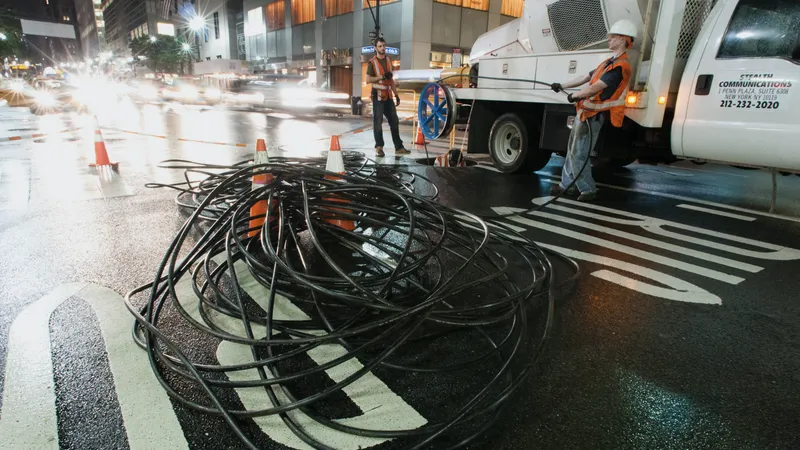
Drop count first, then the building. A drop is one cable run from the IT room to one location, terminated at both ends and tested. Count them honestly before pricing anything, because the count is the multiplier on the whole line.
- Two drops per desk as a normal starting point: one for the computer, one spare for a phone, a second monitor arm dock or a future change.
- One per network printer or copier.
- One per Wi-Fi access point, and access points want ceiling positions, not wherever is easiest.
- One or two per conference room for the display and the room system.
- One per camera, door reader or TV if those exist.
- A few spares in sensible places, because adding one later costs many times what it costs now.
Then the building modifies the price. As a typical Dallas market range, not my price, a standard Cat6 drop in an office with an accessible drop ceiling is commonly quoted somewhere around $150 to $350 per drop. The low end is short, easy, repetitive runs in bulk. The high end is long runs, hard ceilings, concrete, plenum-rated cable where the air handling requires it, or work that has to happen after hours because the building will not allow it during the day. Cat6a and fiber cost more again. I break the arithmetic down in what structured cabling costs for a Dallas office, and the physical work is described on the data cabling and IT room setup page.
What network equipment does a new office need, and what drives its cost?
Less than most people expect, and better than most people buy. A small Dallas office does not need enterprise hardware. It does need business-grade equipment that can be managed, updated and monitored, rather than consumer gear from a big-box store that nobody can see inside.
| Item | Why you need it | What moves the price |
|---|---|---|
| Business firewall | The edge of your network, plus VPN and content filtering | Number of users, whether you need site-to-site VPN, subscription for security features |
| Managed switch | Feeds every drop, powers the access points and phones | Port count, whether it supplies power over ethernet, one switch or two |
| Wi-Fi access points | Coverage that holds up in a real floor plan | Square footage, wall construction, how many devices per person |
| Rack and patch panel | Everything terminates in one tidy, labeled place | Wall-mount versus floor rack, drop count |
| Battery backup | Keeps the network and any server alive through a North Texas flicker | How much equipment it has to hold up, and for how long |
| Server, if you still need one | Only for applications that cannot live in the cloud | Application requirements, storage, whether a cloud alternative exists |
Two decisions swing this line more than any product choice. First, how many access points: guessing low is the most common cause of a new office where the Wi-Fi is bad from week one, and adding one later means pulling another cable through a finished ceiling. Second, whether you need a server at all. Many offices moving into a new Dallas suite discover their one on-premises application now has a hosted version, which removes a server, its battery backup, its cooling and its backup licensing from the budget in one decision.
What should I budget for computers and devices?
Per person, and by role. This is the easiest line to estimate and the easiest to get wrong by treating everyone the same. A receptionist and a designer running rendering software need very different machines, and pretending otherwise either wastes money or produces a person who cannot work.
- Standard office user. As a typical market range, a business-class laptop with a dock and a monitor commonly runs somewhere around $1,000 to $1,800 all in.
- Desk-bound user. A small-form-factor desktop with two monitors is often a little less and lasts longer.
- Design, CAD or heavy data user. Considerably more, driven by graphics and memory requirements from the software maker rather than by preference.
- Printer or copier. Often leased rather than bought, which moves it from the one-time bucket to the recurring one.
- Phones. Desk handsets if people want them, or softphones on the computers and mobiles you already have.
- Conference room. A display, a camera and a speakerphone that work with whatever platform you use, plus the cabling to reach them.
Two pieces of advice that save real money. Do not buy consumer laptops for a business; the warranty, the build and the manageability are different products wearing similar prices, and the reasoning is in buying and supporting Dell and Lenovo business computers. And do not replace everything the week you move if the existing machines are healthy. Stagger replacements over a couple of years so hardware becomes a predictable annual line rather than a cliff every four years.
What are the recurring monthly costs after opening day?
Support, subscriptions, connectivity and backup. These start the month you open and never stop, which is why they belong in the operating budget rather than the build-out budget. They are also the numbers a landlord allowance will not touch.
| Recurring line | What drives it | Typical Dallas market range, not my price |
|---|---|---|
| Managed IT support | Number of users or devices | Around $100 to $175 per user per month |
| Microsoft 365 or Google Workspace | Number of users and the plan tier | A modest per-user subscription, more for advanced security tiers |
| Industry software | Your practice, case or agency system | Usually the largest software line, priced per user by the vendor |
| Business internet | Speed, technology available in the building, contract term | Fiber costs more than cable and is worth it for most offices |
| Phone system | Number of extensions | A small per-extension monthly cost on a cloud system |
| Backup | Users for cloud data, plus servers if you have them | A small per-user subscription, and the last line I would cut |
| Security add-ons | Endpoint protection, email filtering, password manager | Often already inside a managed plan; check before paying twice |
My own managed IT is quoted per user or per device after a short conversation, month-to-month with no lock-in, so the recurring number is knowable before you sign a lease rather than after. If you would rather not commit to a plan at all, hourly support is $100 per hour remote and $150 per hour onsite during business hours, Monday to Friday 8 AM to 5 PM Central, with a one-hour minimum. The full annual picture, including hardware replacement reserves, is in what a small business should budget for IT each year.
What does the budget look like for a 12-person Dallas office?
Here is a worked shape rather than a quote, for a twelve-person professional office in a Dallas suite with an accessible drop ceiling, no onsite server, and everything bought new. Change the drop count or the headcount and every line moves with it.
| Line | Assumption | Planning range |
|---|---|---|
| Cabling | 30 drops at typical market rates | $4,500 to $10,500 |
| IT room | Wall rack, patch panel, power, labeling | $1,000 to $2,500 |
| Firewall and switching | One firewall with a security subscription, one managed switch with power over ethernet | $1,500 to $4,000 |
| Wi-Fi | Three to four ceiling access points | $1,200 to $2,800 |
| Computers and monitors | 12 business laptops with docks and screens | $12,000 to $21,600 |
| Conference room and printer | One room system, one network printer | $1,500 to $4,000 |
| Setup and project labour | Design, configuration, install, move day, first-morning support | Quoted per project after a walkthrough |
| One-time total | Excluding labour and any server | Roughly $21,700 to $45,400 |
| Recurring, monthly | Support, subscriptions, internet, phones, backup | Low thousands per month, driven by your industry software |
Read the spread rather than the midpoint. The low end is a simple space, easy runs, sensible hardware choices and some existing equipment reused. The high end is a difficult ceiling, after-hours building access, high-specification workstations and everything new on the same day. Most offices land somewhere in between, and knowing which end you are near takes one walkthrough of the space.
Where do new offices get surprised, and where can you safely spend less?
The surprises are consistent enough to list. So are the places where spending less costs you nothing, which is the more useful half.
- Surprise: internet lead time. A fiber circuit into a building that does not have it yet can take considerably longer than a build-out. Order early and have a temporary plan.
- Surprise: after-hours building rules. Some buildings only allow cabling work outside business hours, which changes the labour rate on the largest physical line.
- Surprise: the IT room that is not a room. A closet with no power, no ventilation and a water pipe running through it will cost you either money or reliability.
- Surprise: the phone number. Porting an existing number takes coordination and cannot be rushed on move week.
- Surprise: nobody owns move day. Equipment arrives, nobody configured it, and the first morning is spent on the floor with a laptop.
- Safe saving: reuse healthy computers. Move them, do not replace them, and stagger the refresh.
- Safe saving: skip the onsite server when a hosted version of your application exists.
- Safe saving: right-size the license tiers. Not everyone needs the top plan.
- Never save on: drop count, access point count, backup. All three are cheap now and painful later.
The pattern is simple. Spend on the things that are physically hard to change once the office is finished, and be relaxed about the things you can adjust any month.
Who puts the numbers together and does the work in Dallas?
I do. Cross River Tech is a small, owner-led managed IT company in Dallas, and a new office is the kind of project where having one company, with me planning it and staying your point of contact across cabling, network, devices and support, saves you the coordination overhead of three vendors pointing at each other.
- A walkthrough or a look at your floor plan, which produces a real drop count instead of an estimate.
- A written budget in the two buckets above, so you can see what hits the build-out and what hits the monthly.
- Cabling, IT room, firewall, switching and Wi-Fi installed, terminated, tested and labeled.
- Internet ordered and chased, because the ISP will not chase itself.
- Computers, accounts, files and phones ready before the first morning rather than during it.
- Ongoing support afterwards from the people who built it, with me as your point of contact, or no ongoing commitment at all if you would rather handle it yourself.
Hardware is quoted at what it costs, project work is quoted per project after I have seen the space, and I will tell you when a line in your budget is larger than it needs to be. I work onsite by appointment across Dallas and the metroplex, and remotely anywhere in Texas. If you have a lease signed or a floor plan in hand, send me the square footage and the headcount and I will come back with the drop count and a budget you can actually take to a partner meeting. If you are earlier than that and just working out who does what, start with who sets up the computers and network for a new Dallas business.
Questions people ask
How much does it cost to set up IT for a new Dallas office?
For a twelve-person office with new equipment and around thirty cable drops, planning ranges commonly land somewhere between the low twenties and mid forties of thousands of dollars for the one-time side, before project labour. Recurring support, subscriptions and internet then run in the low thousands per month. Those are typical market ranges for planning; a real number needs a drop count and a walkthrough.
What is the biggest single line in a new office IT budget?
Computers, in almost every case, because it multiplies by headcount. Cabling is usually second and rises fast in buildings with hard ceilings or after-hours access rules. Network equipment is smaller than people expect. The line most often missing entirely is project labour: the design, configuration, installation and move-day work that turns delivered boxes into a working office.
When should IT get involved in a new office project?
As soon as you have a floor plan, and before the construction drawings are final. Cable paths, the IT room location, power in that room and access point positions are all far cheaper to decide on paper than to change in a finished ceiling. Involving IT after the walls close is the most common reason a new office budget grows.
Can I reuse the equipment from my current office?
Usually some of it. Healthy computers, monitors and printers move well and should move. Consumer routers and unmanaged switches are worth retiring. An old firewall past its support life should be replaced, since it no longer receives security fixes. I go through what is worth moving during the walkthrough, because every item reused is money that stays in your budget.
Do I need a server in a new office?
Often not any more. If your email, files and main application all have cloud versions, skipping the server removes its cost, its battery backup, its cooling, its licensing and its backup complexity. A server still makes sense when a specific application requires it locally or when very large files need speed on the office network. It is worth checking before assuming.
How do I compare IT quotes for a new office fairly?
Insist that every quote uses the same drop count, the same access point count and the same device specifications, then compare line by line. Check whether labour, testing, labeling and warranty are included or excluded. A quote that is dramatically cheaper is usually cheaper because something was left out, and the missing item shows up as a change order later.